Open to load usage…
Roamavia
WELCOME TO ROAMAVIA
Create an account or log in. Once you’re in, Roamy will tailor the app around the way you travel.
By continuing, you agree to Roamavia’s Terms and acknowledge the Privacy Policy.
WELCOME BACK
Choose how you’d like to continue.
New phone or session missing? You can still create an account above.
By continuing, you agree to Roamavia’s Terms and acknowledge the Privacy Policy.
WELCOME TO ROAMAVIA
Create an account to get your reusable eSIM, or log in to see your existing balance and trips.
No balance is created or charged until you choose your first top-up.
YOUR HOLIDAY DASHBOARD
Choose your destination and we’ll show straightforward fixed and unlimited plans with the price, data and duration upfront.

ROAMAVIA GLOBAL
Available balance
Choose networks manually. Pricier-network usage can’t be refunded.
ROAMAVIA GLOBAL
Global PAYG works across supported countries. Top up credit, check the local rate and always choose the cheapest supported network.
FIRST, SET UP YOUR ESIM
Your first purchase creates your reusable Roamavia eSIM. It includes a one-time £1.50 eSIM setup fee; the rest becomes usable data balance.
One eSIM setup fee. Future top-ups are added in full.
YOUR CURRENT TRIP
ROAMY’S TRAVEL TIP
Keep your Roamavia Global eSIM installed and only top up credit. Rates vary by country and network, so check Network before connecting and select the cheapest supported operator manually.
FEATURED DATA
TRAVEL PLANS
Choose a destination and we’ll show the clearest options for your trip.

Popular right now
Choose your package
MY ESIMS
Roamavia Global
Your eSIM details will show here.
Use your Global balance in supported destinations.
Select the recommended network manually. Extra Global credit used while Automatic chooses a more expensive operator can’t be refunded.
Connect to check service status.
Travel plan eSIMs
Purchased travel-plan eSIMs will appear here.
ROAMAVIA GLOBAL PRICES
YOUR LOCATION
We’ll show the cheapest supported network here.
Prices vary. Choose a network marked cheapest.
Don’t leave Network Selection on Automatic. Your phone may choose a more expensive operator, and extra Global credit used on the wrong network can’t be refunded.
YOUR TRAVEL PLAN
Choose the eSIM you’re using and connect only to a network shown for that plan.
YOUR ROAMAVIA
Preferences
Data controls
Open to load usage…
Purchases
Loading purchases…
Rewards
CASHBACK STATUS
Loading your cashback…
— spent this yearCompleted Global top-ups, fixed plans and unlimited plans count towards your tier. Cashback credit is paid into Roamavia Global. Your tier resets on 1 January each year.
Connect Apple or Google for faster access without changing your Roamavia account.
LATEST UPDATES
A quicker look at what’s changed in this version.
HELP & SUPPORT
Open a quick guide or send your issue directly to the Roamavia support team.
Do not delete your eSIM. It may not be possible to reinstall it.
If a payment looks complete but your balance has not updated, do not submit it again. Check Transaction history in Account, then tell support the approximate amount and time.
Never send a full card number, expiry date, CVV, password or authentication code.
Used Global credit and used plan data are not refundable. This includes extra Global credit used when a phone connects to a more expensive network. Faults and statutory consumer rights are assessed individually.
Your message will go straight to human support. We’ll reply using the email on your account.
Don’t share passwords, security codes or full card details. Messages disappear from this screen when you close it.
ROAMAVIA REFERRALS
Your friend joins with your link and completes their first £20+ Global top-up. You earn £1 in your Roamavia Global balance and you both enter that month’s giveaway.
ONE CHANCE
Add your friend’s referral code now. Once applied—or skipped—it cannot be changed later.
After your first £20+ Roamavia Global top-up, they earn £1 Global credit and you both enter the £50 monthly giveaway.

WHICH ESIM ARE YOU USING?
I’ll only show the networks that apply to the eSIM you select.
TRAVEL READY
Your personalised checklist
iPhone does not let apps read your selected SIM, Data Roaming or operator. Tap those three checks after confirming them in Settings.
NO SERVICE? 📵
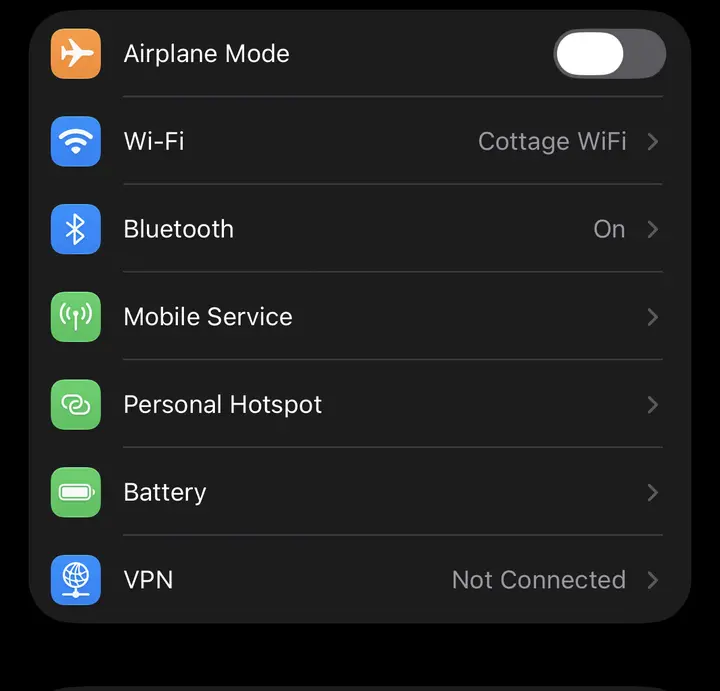
Open iPhone Settings, then tap Mobile Service.
DELETE ACCOUNT
This cannot be undone. Your profile and personal account information will be removed.
Any remaining credit and plan data will be permanently deleted with your account and cannot be recovered or refunded.
ESIM ALREADY INSTALLED
You’ve already installed this eSIM. Only reinstall it if you deleted it from your phone or Roamavia Support asked you to.
We’ll move your unused Global data balance to a new eSIM. Your old eSIM will stop working when its balance return begins. Roamy normally prepares the new eSIM shortly after payment while the supplier settles the old balance in the background. If your eSIM is faulty, contact support for a remedy.
AFTER YOUR PURCHASE
Your purchase stays in My eSIM. Follow these steps once your eSIM is ready.
ADD CREDIT
Choose how much to add to your Roamavia balance. Pay securely without leaving the app.
Before using Global credit: turn Automatic network selection off and choose the recommended operator. Extra credit used on a more expensive operator can’t be refunded.
CREDIT ADDED
Before using mobile data, check the recommended operator in Network and select it manually.
Automatic can cost more. Extra Global credit used because your phone chose a more expensive operator can’t be refunded.
SECURE IN-APP PAYMENT
Payment is handled securely by Stripe without leaving Roamavia.
BEFORE YOU BUY
TOP UP YOUR PLAN
Choose how much data to add. The plan’s original expiry date will not change, and expired plans cannot be topped up.
LOCATION & ALERTS
Roamavia needs location set to Always Allow so it can recognise when you land, even if the app is closed. We use the country change to show the cheapest network and never display your precise location.
1 · Tap Allow While Using App on the first prompt
2 · Tap Change to Always Allow when iPhone asks
3 · Allow notifications for arrival and welcome-home advice
AVAILABLE WITHOUT DATA
CONNECTION CHECK
UPDATE AVAILABLE
Update from the App Store to get the latest fixes, security improvements and travel features.
SECURE PAYMENT
Verifying your payment and creating your travel plan. This normally takes a few seconds.
ROAMAVIA MAINTENANCE